
Download AppLock Theme Dazzle light APK – Android AppLock Theme Dazzle light, Multimedia App, Graphic & Design, Custom Lock Screen, Personalized Experience
Overview
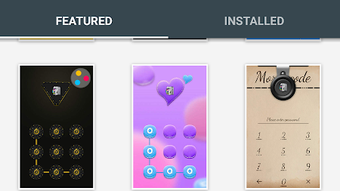
AppLock Theme Dazzle light is a multimedia application designed for Android devices, offering users a visually engaging way to personalize their lock screen experience. The app functions as a theme pack for the AppLock application, requiring AppLock version 2.30 or higher to operate. As a graphic and design tool, it enables users to enhance the aesthetics of their device’s lock screen with customizable elements such as backgrounds, fonts, and color schemes.
The primary purpose of the app is to provide a unique and expressive interface that reflects individual style. It is ideal for users who value personalization and visual appeal in their mobile experience. The app is particularly suited for consumers seeking a creative way to differentiate their Android devices.
It supports Android 6.0 and above, ensuring compatibility with a wide range of devices. The application is free to download and use, making it accessible to a broad audience. Real-world usage includes customizing lock screens for daily use, special events, or personal branding.
The developer, AppLock, focuses on user-centric design and security integration through its theme ecosystem.
Key Features & Capabilities
- Visual Customization Suite – Offers a variety of background designs, color palettes, and font styles to tailor the lock screen appearance.
- Personal Photo Integration – Allows users to upload and apply their own images as lock screen backgrounds.
- Theme Compatibility – Designed specifically to work with AppLock v2.30 and later, ensuring seamless integration with the core app.
- Easy-to-Use Interface – Features a streamlined navigation system for quick theme selection and application.
- Dynamic Visual Effects – Includes light-based visual enhancements that respond to device interactions, adding a sense of interactivity.
These features enable users to transform their lock screen into a dynamic, personalized display. For example, users can apply a favorite photo as a background and pair it with a sleek font and accent color to create a cohesive look. The theme is especially useful for users who frequently switch between different styles or want to match their device’s appearance with their mood or outfit. The integration with AppLock ensures that customization does not compromise device security. While the app is free, its functionality is limited to visual enhancements and does not include additional locking features beyond those provided by the base AppLock application.
User Interface, Workflow & Performance
The user interface of AppLock Theme Dazzle light is structured around a clean, intuitive layout that prioritizes accessibility. Navigation is straightforward, with categorized options for backgrounds, fonts, and color schemes. Users can preview changes in real time before applying them, reducing the need for trial and error.
The workflow is optimized for minimal steps—select a theme, adjust settings, and apply—making the process efficient even for less tech-savvy users. The app integrates directly into the AppLock ecosystem, meaning users do not need to navigate through multiple menus or settings. Performance observations are based on general software behavior patterns.
The developer did not specify resource usage details. However, as a lightweight theme application, it is expected to have minimal impact on system performance. Stability is maintained through integration with the established AppLock platform, which has a proven track record in the Android environment.
The app does not require constant background processes, and its operation is limited to visual rendering during lock screen interactions.
Compatibility & System Requirements
AppLock Theme Dazzle light is designed for Android devices running version 6.0 (Marshmallow) or higher. The app is compatible with a wide range of smartphones and tablets that meet this minimum OS requirement. Installation size is not specified in the provided information.
The developer did not provide additional system requirements. Compatibility information is limited to the OS version and the dependency on AppLock v2.30 or later. The app is distributed as an APK file, allowing direct installation on Android devices without requiring the Google Play Store.
This makes it accessible to users in regions with limited access to the official app marketplace. The application is not available for Windows, Mac, or other desktop operating systems. The developer did not specify hardware requirements such as RAM or CPU specifications.
Performance behavior on specific devices was not documented.
Pros and Cons
Pros
- Free to download and use
- Easy integration with AppLock application
- Offers a variety of customization options for lock screen appearance
- Supports personal photo uploads for unique backgrounds
- Designed with a user-friendly interface for quick setup
Cons
- Requires AppLock v2.30 or higher to function
- Not compatible with devices running Android below 6.0
- Limited to visual customization; no additional functionality beyond theme application
- Resource usage details not disclosed
- APK distribution may raise security concerns for cautious users
FAQ Section
Is AppLock Theme Dazzle light compatible with my Android device?
AppLock Theme Dazzle light requires Android 6.0 or higher and AppLock v2.30 or later. If your device meets these conditions, the app should function properly.
Can I use this theme without installing AppLock?
No. The theme is designed to work exclusively with AppLock. It cannot be used independently and requires the base AppLock application to be installed.
Is the app safe to download and install?
The app is distributed as an APK file. While it is developed by AppLock, users should ensure they download from trusted sources to avoid potential security risks associated with third-party installations.
Does the app require an internet connection?
The app does not require a constant internet connection to function. However, initial setup and theme downloads may need connectivity.
How often are updates released?
Update frequency was not specified. Users are advised to check the developer’s official website or trusted distribution platforms for the latest version.
Final Thoughts + CTA
AppLock Theme Dazzle light delivers a focused and visually appealing solution for users who want to enhance their Android lock screen with personalized design elements. Its seamless integration with AppLock and support for custom images and styles make it a compelling choice for consumers seeking a stylish, expressive interface. While it lacks advanced functionality beyond aesthetics, its simplicity and ease of use are significant strengths.
The app is particularly beneficial for users who value visual customization and want a quick, free way to refresh their device’s appearance. With no additional cost and a straightforward setup, it offers good value for its intended purpose. For those looking to add a touch of personality to their Android experience, this theme is a solid option.
Download AppLock Theme Dazzle light now.






.png)
